



The Browse Library window lists the styles available to your account in tabs; you add the ones you select to the event in one go. Added styles go into the Active AI Effects list and into the Art style section of the guest's drawing screen.
This guide covers AI Drawing Screen 2.2.2. Available controls may vary by platform and version; platform-specific limitations are noted below.
- An event must be created and selected.
Step by step
Step 1 · Open the library
AI Assets → AI Effects → Browse Library
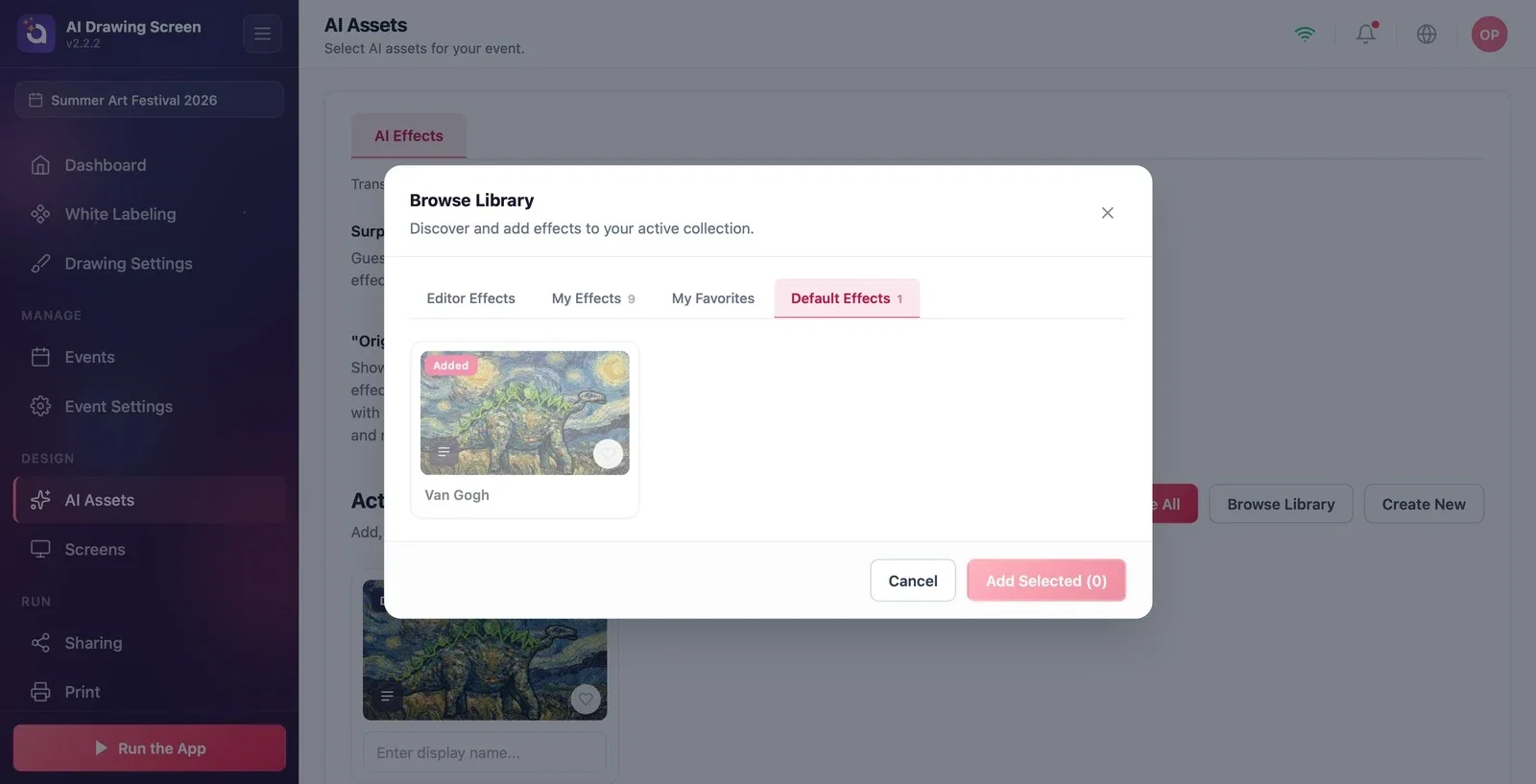
Click the Browse Library button to the right of the Active AI Effects heading. The window has four tabs:
- Editor Effects: styles prepared by Activation King (may still be empty for this product). - My Effects: styles you created or copied. - My Favorites: styles you marked as favorites. - Default Effects: the default styles that come with the product (e.g., 'Van Gogh').
Cards for styles already used in the event show an Added label.
Step 2 · Select and add styles
Browse Library
Click the cards of the styles you want to add to select them (you can select more than one); the add button at the bottom shows the number selected. Click the button to add the styles to the event and close the window. To back out, click Cancel.
Step 3 · Reorder and check
AI Assets → Active AI Effects
Added styles appear as cards in the Active AI Effects list; the count next to the heading updates. Drag the cards to change the order on the shelf; to remove a style from the event, use the X on its card (the style is not deleted from your library). You can see the result in the preview on the Drawing Settings page, in the Art style section.
When you add more than one style, guests choose from the shelf; if you leave a single style, it is applied automatically.
To create your own style, use Create New (see Creating a Custom Style).
Removing every style with Remove All — if no style is left in the event, guests can't send their drawing to the AI.
Adding styles made for photo products (portrait, face swap) — these styles expect a photo, so they can give unexpected results with drawings; try them yourself first.
Related topics
AI AssetsCreating a Custom StyleGuest Flow