
Two-factor authentication (2FA) adds a second step to signing in: a rotating 6-digit code from an app on your phone. That means a stolen password alone is not enough to get into your account, giving you much stronger protection.
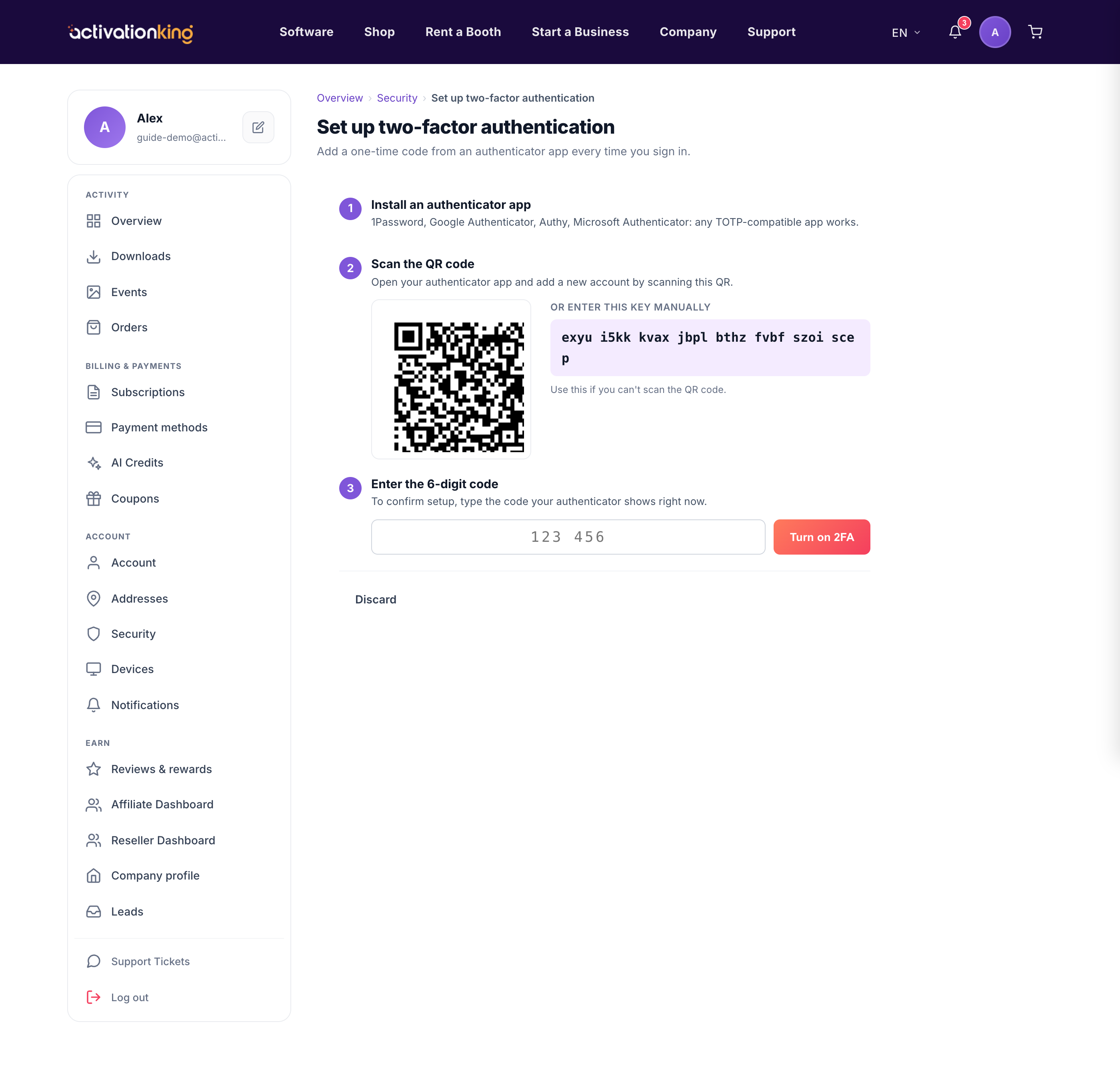
Step 1: Install an authenticator app
On your phone, install an authenticator app such as Google Authenticator, Microsoft Authenticator, Authy, or 1Password. Any of these will generate the codes you need.
Step 2: Scan the QR code
In Dashboard → Security, open the two-factor card and start setup. Open your authenticator app and scan the QR code shown on screen.

If you cannot scan, most apps let you type the shown key manually instead.
Step 3: Verify and save recovery codes
Enter the 6-digit code your app currently shows to confirm the connection and switch 2FA on. You then receive 10 one-time recovery codes: save, print, or regenerate them and keep them somewhere safe.
Good to know: from now on, sign-in asks for your password and then a fresh 6-digit code. If you ever lose your phone, one of your recovery codes will get you back in.
