
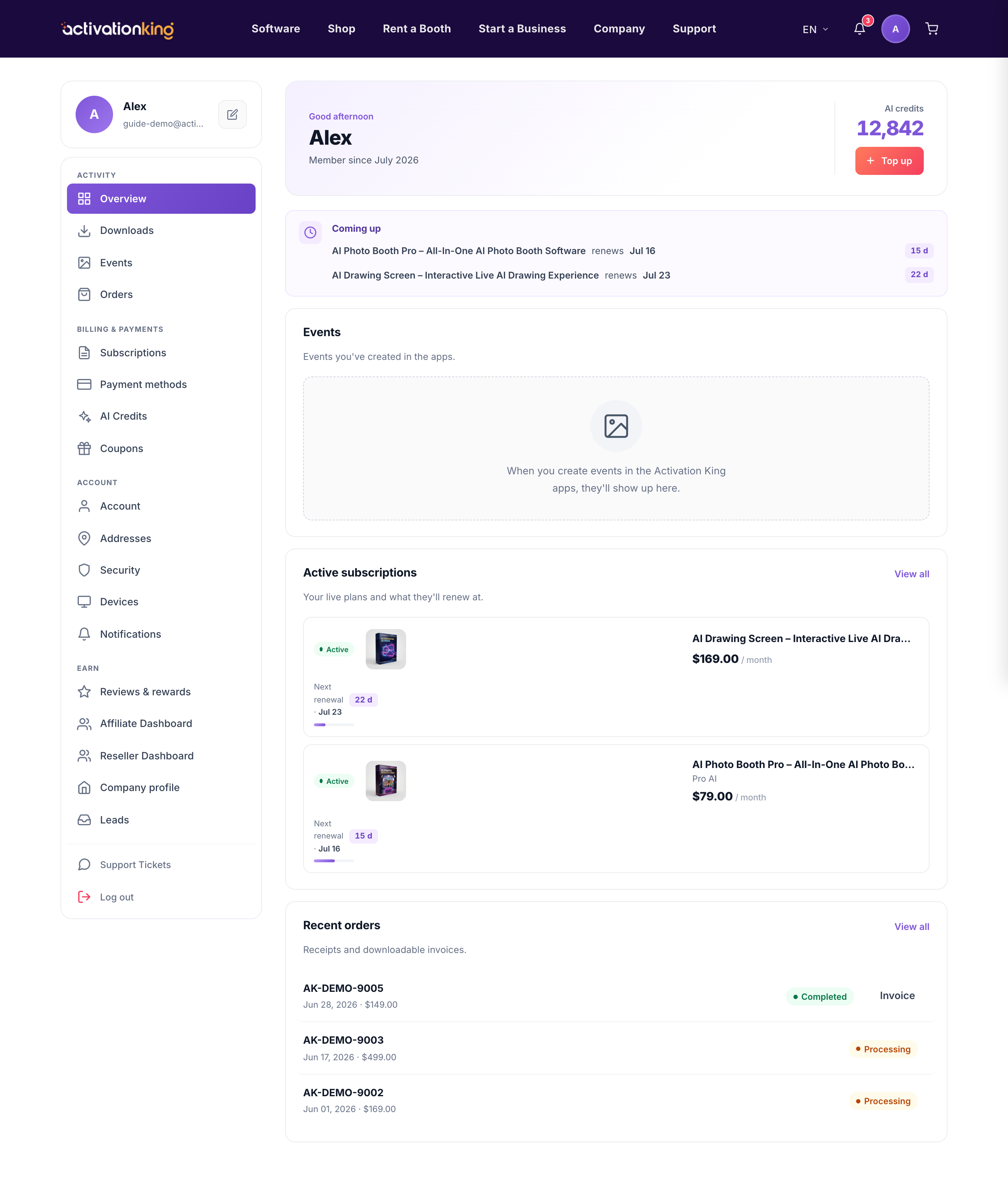
Your dashboard is the home base for your entire Activation King account. It brings your events, downloads, billing, and account settings together in one place, so you can manage everything from a single screen.
The hero at the top
When you sign in, a personal greeting welcomes you back and shows how long you have been a member. Beside it you will see your current AI Credits balance and a Top up button to add more whenever you are running low.
The left sidebar
The sidebar is your map to every area of the account, grouped so related tasks sit together:
- Activity: Overview, Downloads, Events, and Orders.
- Billing and payments: Subscriptions, Payment methods, AI Credits, and Coupons.
- Account: Account, Addresses, Security, Devices, and Notifications.
- Earn: Reviews and rewards, Affiliate, Reseller, Company profile, and Leads.
The main area
The center of the page surfaces what matters right now: your upcoming items, your event galleries, and your active subscription tiles with quick Manage, Update card, and Cancel actions. Below that you will find your recent orders. If you are new, a short 3-step onboarding guide helps you get set up quickly.
Getting around
- Sign in to your account, and you land here on the dashboard.
- Use the sidebar to jump straight to any area you need.
Good to know: the bell in the header shows your unread notifications, and the avatar menu displays your current plan tier from any page, so you always know where you stand.
