
Your company profile is your business identity on Activation King. It powers both your public Rent listing and your Reseller directory card from a single place, so anyone looking for an operator or partner sees the same up-to-date details.
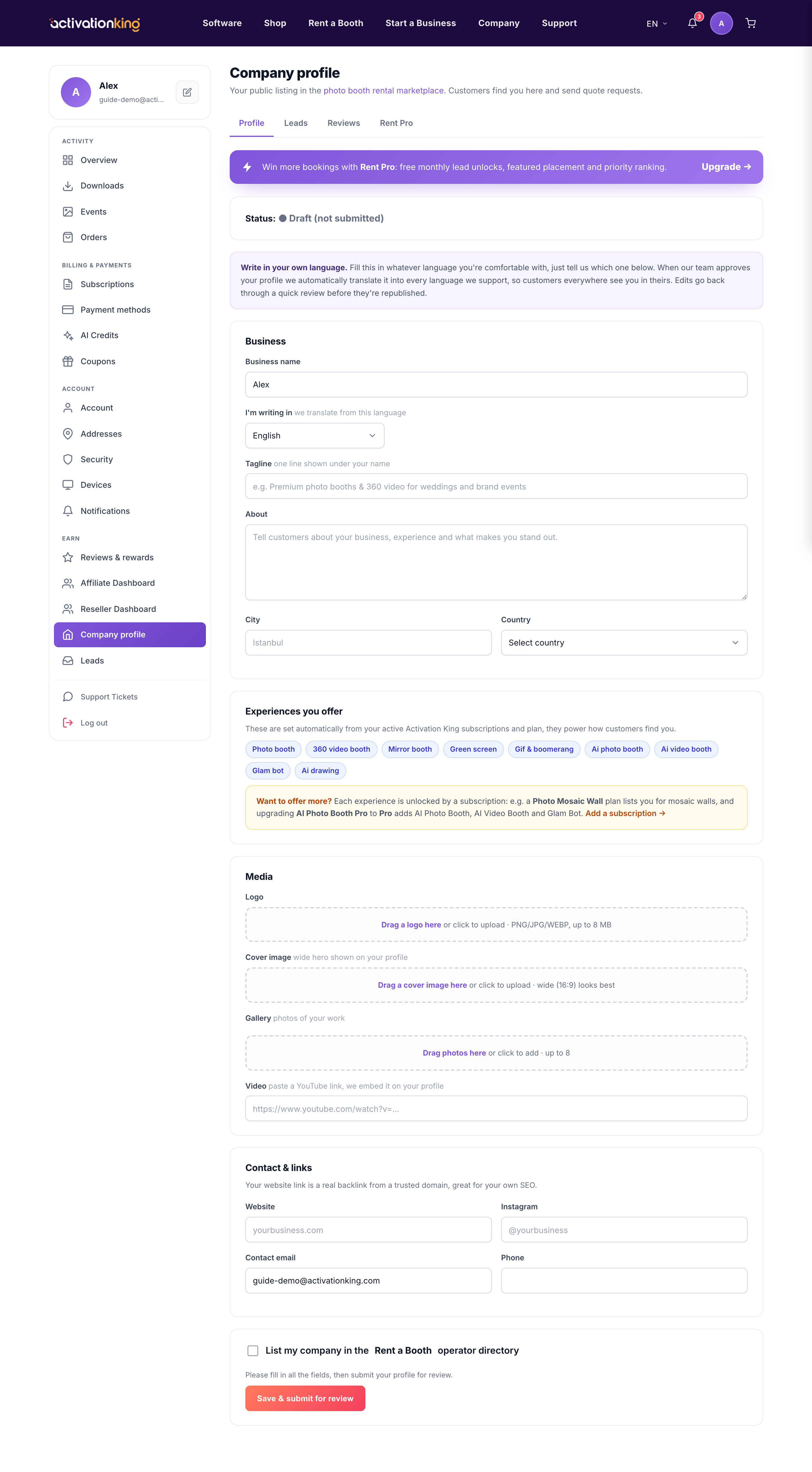
Completing the profile takes a few minutes and gives you a credible, searchable presence in the directory. Have your logo, some event photos, and your contact details ready before you start.
- Open Dashboard → Company profile. The profile editor opens with all of your fields in one form.
- Upload your logo, then write a short tagline and a longer about text that explains who you are and what makes your work stand out.
- Fill in your city and country, your website, and a contact email and phone so customers and partners can reach you.
- Add a photo gallery of your work by uploading real images from your events.
- List the services you offer so you appear for the right requests.
- Click Save to store your changes. You can return and edit any field later.
- When the key fields are complete, click Submit for review. Your profile is checked before it goes live in the directory.
Good to know: a complete profile with a strong gallery wins more leads and looks far more credible in the directory. Use real photos from your own events rather than stock images, and keep your services and contact details current so nothing sends a customer to a dead end.
