
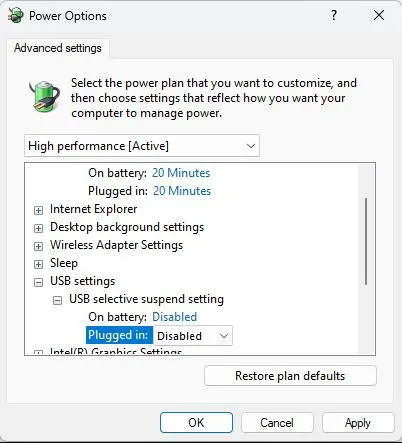
For USB devices, Windows enables a power-saving feature called USB Selective Suspend. It saves power by shutting down USB ports that are only used intermittently. This causes problems with DSLR cameras, so we recommend turning it off.
Windows 11
- Open Control Panel → Hardware and Sound → Power Options.
- Select High Performance.
- Click Change plan settings, then Change advanced power settings.
- Expand USB settings → USB selective suspend setting and set it to Disabled.
- Click Apply.
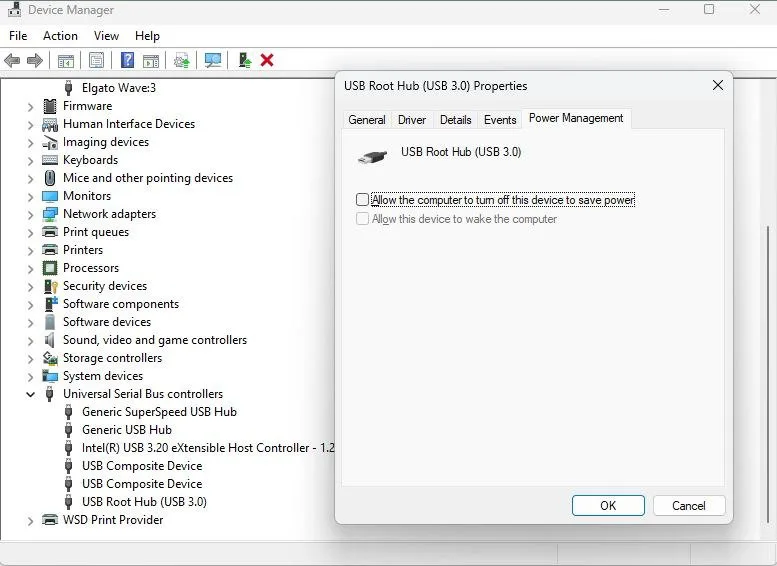
Next, open Device Manager → USB Root Hub and uncheck Allow the computer to turn off this device to save power.
Windows 10
On Windows 10, open Device Manager → Universal Serial Bus controllers. Double-click the USB Root Hub device and open the Power Management tab. Turn off Allow the computer to turn off this device to save power and click OK.
