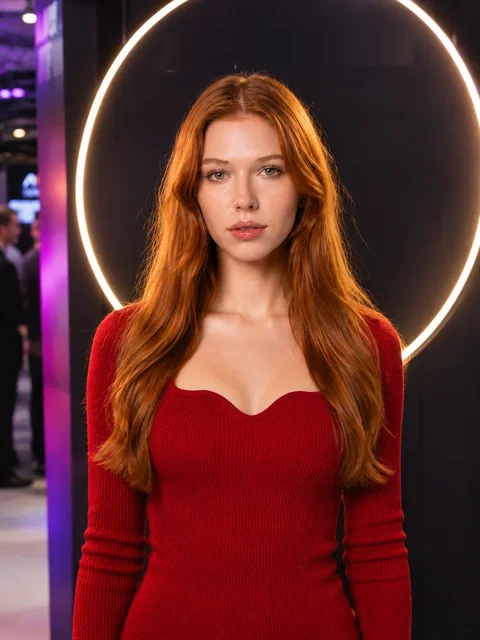
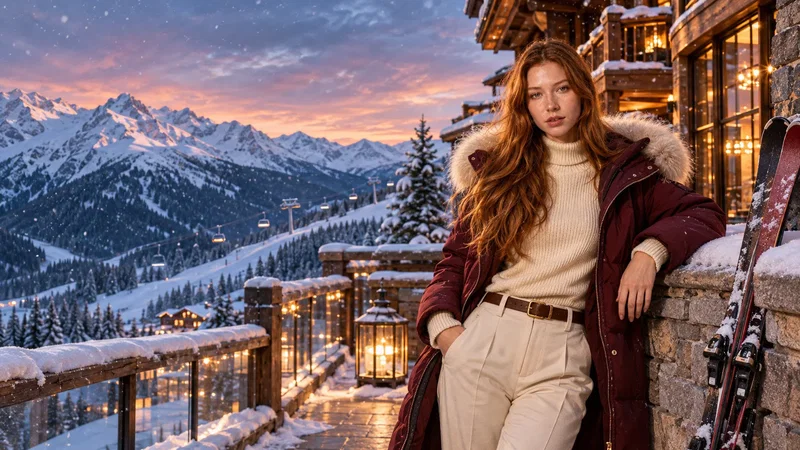
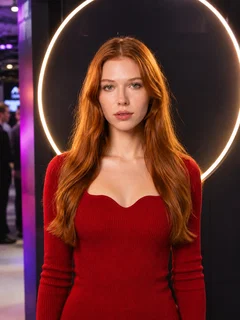
Every frame starts from the original guest photo. Make the middle and final frames with the image prompts, then turn the three frames into a 10-second video with the video prompt. Results depend on the model and the guest photo.
1Original photoThe guest photo taken at the booth. Every frame uses it as the identity reference.
2Middle frameThe moment the guest starts entering the brand world, made with the middle frame prompt.
3Final frameThe full brand world with the guest as the star, made with the final frame prompt.
410-second videoKling 4.0 joins the three frames into one shot with the video prompt.
Independent creative concept examples. They are not official partnerships with, or endorsed by, the named brands.
Pick a scene, copy the prompt.
Open a scene to see the full prompt, the model it was tested with and how many guests it was tested with.
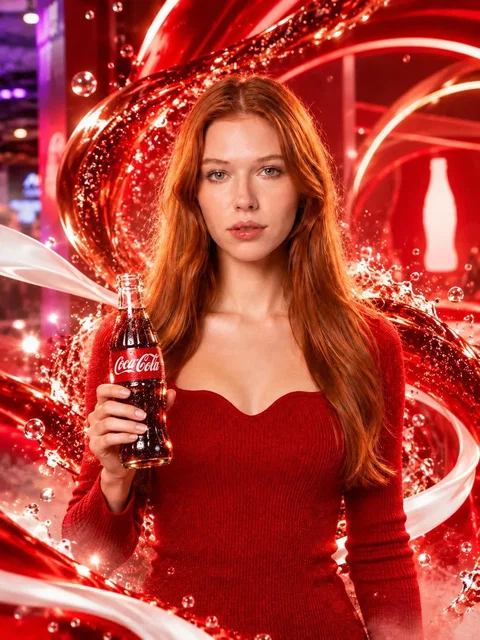
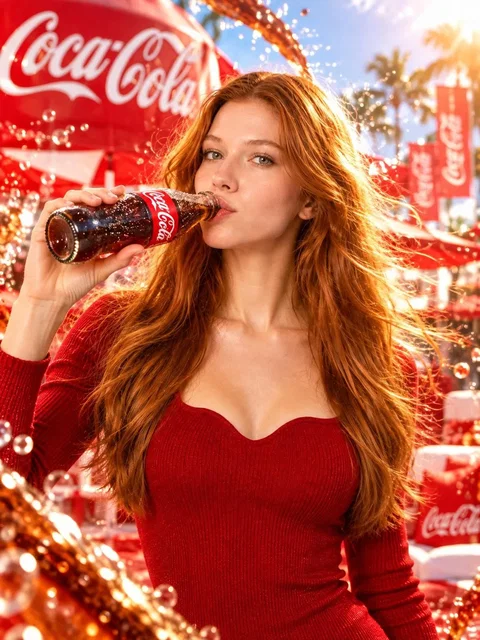
A bottle pop turns the guest's photo into a fizzing summer festival world.
Use the original participant as the strict identity reference and create a spectacular final Coca-Cola branded world. Preserve the participant’s exact face identity, hairstyle, skin tone, body proportions, and recognizable expression. Keep the participant as the only person in the image. Do not add extra people.

Place the participant in a vibrant Coca-Cola dream world with a joyful, cinematic, premium commercial atmosphere. The environment should feel like an extraordinary branded celebration filled with iconic Coca-Cola red and white colors, sparkling soda bubbles, flowing liquid arcs, refreshing mist, glowing highlights, and an energetic summer festival mood.

The participant should be the clear central star of the scene and must be actively drinking Coca-Cola. Show her naturally lifting the Coca-Cola bottle to her lips and taking a sip in an elegant, photorealistic way. Her expression should feel happy, refreshed, and genuinely enjoying the drink. Her posture should remain graceful and attractive, with subtle wind in her hair and a lively premium advertising feel.

The Coca-Cola bottle must be clearly visible and recognizable, naturally held in her hand, with the drinking action clearly readable. Keep the focus on the participant while the branded celebration environment glows around her. The result should feel like the final hero moment of a luxury Coca-Cola commercial: uplifting, refreshing, youthful, and visually unforgettable.

Important: preserve the participant’s face very accurately, keep only one person, no duplicate body parts, no extra faces, no watermark. Photorealistic, cinematic, high-end advertising quality, detailed lighting, premium brand campaign style.
Use the original event photo as the identity reference and transform it into a premium Coca-Cola themed transition scene. Preserve the participant’s exact face identity, hairstyle, skin tone, body proportions, and overall pose as closely as possible. Keep the participant as the only person in the image. Do not add extra people.

Show the participant at the exact moment of entering a Coca-Cola world. Add a Coca-Cola bottle or can naturally integrated into the scene, with the brand clearly recognizable. Surround the participant with dynamic red and white liquid ribbons, sparkling soda bubbles, glowing splashes, refreshing mist, and energetic flowing shapes inspired by Coca-Cola branding. The event environment should still be partially visible, but it is beginning to transform into a vibrant branded fantasy space.

Keep the participant sharply visible in the foreground, front-facing, elegant, and photorealistic. The clothing can remain similar to the original, but with subtle premium styling enhancements and natural red reflections from the environment. The overall feeling should be exciting, refreshing, branded, and cinematic. This is a transition keyframe, not the full final branded world.

Important: preserve the participant’s face very accurately, keep only one person, no duplicate body parts, no extra faces, no text overlays, no watermark. High-end commercial photography, cinematic lighting, premium advertising look, ultra-detailed, realistic.
Create a spectacular 10-second single-take Coca-Cola branded commercial using the three provided keyframes in chronological order. Preserve the participant’s exact identity, face, hairstyle, and body proportions throughout. The participant must feel alive, expressive, natural, and emotionally engaged, never stiff, mannequin-like, or frozen.

PERFORMANCE DIRECTION:

The participant is a real person, not a static model. Add subtle natural human motion throughout the video: gentle breathing, soft blinking, expressive eyes, small head movements, relaxed shoulder shifts, natural hand and wrist motion, and graceful posture adjustments. Her expression should evolve from calm and neutral into a soft authentic smile, then into a brighter refreshed smile. Her hair should move naturally with airflow and motion, especially in the final reveal.

0-3 SECONDS:

Start from the original event photo. Use a cinematic dolly-in with a soft orbital camera move. The participant gently comes alive with subtle breathing and a natural blink. She forms a soft smile and elegantly raises the Coca-Cola bottle. She then pops open the Coca-Cola bottle cap with a clear, satisfying, energetic action. The cap opening must create a visible burst of fizz, sparkling soda spray, carbonation mist, bubbles, and explosive red-and-white liquid ribbons that launch the transformation. This cap-pop moment should feel exciting, premium, and physically clear.

3-6.5 SECONDS:

Transition smoothly toward the middle keyframe. The swirling Coca-Cola liquid, bubbles, mist, and brand-colored ribbons move dynamically around the camera. Let the camera and liquid create most of the motion; avoid making the participant spin unnaturally. The participant stays physically believable, elegant, and mostly front-facing, reacting with delight and a slightly brighter smile. Her hair moves softly with the transformation. Keep her face readable and attractive.

6.5-10 SECONDS:

Transition into the final keyframe with a premium Coca-Cola world reveal. The environment opens into a bright, joyful branded celebration space. Add a gentle wind effect so her hair flows naturally and beautifully. The participant becomes warmer, happier, and more refreshed. In the final moments, she naturally lifts the Coca-Cola bottle to her lips and takes a sip, clearly and elegantly drinking the Coca-Cola. This drinking action should be smooth, readable, and satisfying. After the sip, she lowers the bottle slightly and finishes in a confident refreshed hero moment with a soft smile and expressive eyes.

VISUAL STYLE:

Premium Coca-Cola commercial, vibrant and joyful, realistic liquid physics, sparkling carbonation, cinematic lighting, polished photorealism, elegant camera movement, seamless transitions, dynamic parallax, high-end advertising finish.

CRITICAL CONSTRAINTS:

Use the three keyframes in order. Preserve the participant’s exact identity. Exactly one participant only. No duplicate people, no face morphing, no extra limbs, no broken anatomy, no stiff mannequin pose, no frozen expression, no unnatural spinning body, no abrupt cuts, no flicker, no warped bottle, no unstable branding. Keep the participant attractive, expressive, natural, and alive in every second.
A can opening becomes a rocky passage and a wingsuit flight over the mountains.
Use the original participant as the strict identity reference and create a dramatic final Red Bull action keyframe. Preserve the participant’s face identity, hairstyle, skin tone, and overall recognizability as much as possible. Keep the participant as the only person in the image.

Do not create a static portrait. Show the participant wearing a sleek wingsuit or Red Bull-inspired flight suit, flying dynamically toward the camera through a natural rocky tunnel opening in a dramatic mountain valley. The cave-like opening or circular rock hole behind her should clearly feel like the visual match to the opening of the Red Bull can. She should appear to be emerging out of the tunnel into open air, mid-flight, with strong forward motion toward the camera.

Her hair should be blowing dramatically in the wind, and the suit should show natural motion from fast flight. The background should reveal a breathtaking valley with cliffs, depth, sky, and adventure scale. The action should feel energetic, exhilarating, and cinematic, clearly expressing the idea that Red Bull gives you wings.

Keep the participant’s face readable and heroic, with an energized, confident expression. Add motion energy, wind, depth, and a premium advertising look. The overall result should feel like a high-end Red Bull action commercial keyframe.

Photorealistic, cinematic, dynamic action composition, strong motion, premium outdoor lighting, ultra-detailed.

Important: exactly one participant, no extra people, no duplicate body parts, no watermark.
Use the original participant photo as the strict identity reference and transform it into a premium Red Bull transition scene. Preserve the participant’s exact face identity, hairstyle, skin tone, body proportions, and overall pose as closely as possible. Keep the participant as the only person in the image. Do not add extra people.

Show the participant holding a clearly recognizable Red Bull can in a natural and confident way. The participant is in the exact moment of opening the can. The can opening tab is lifted, and the top opening is visible. Around the can, create an energetic burst of carbonation mist, sparkling droplets, cold vapor, metallic highlights, and dynamic blue-silver energy accents inspired by Red Bull branding. The scene should feel charged, fresh, and powerful.

The event environment should still be partially visible, but it is transforming into an adventure world. Behind and around the participant, subtle hints of canyon textures, rocky surfaces, wind, dust, and dramatic outdoor atmosphere begin to appear. The opening of the can should visually feel like a portal or gateway into an extreme natural world.

Keep the participant sharply visible, front-facing, and photorealistic. Her expression should feel more alive, energized, and slightly excited. Maintain elegant natural body posture. High-end advertising style, cinematic lighting, ultra-detailed, premium commercial realism.

Important: preserve the face accurately, keep only one person, no duplicate body parts, no extra people, no text overlays, no watermark.
Create a spectacular 10-second single-take Red Bull commercial using the three provided keyframes in chronological order. Preserve the participant’s exact identity, face, hairstyle, and body proportions throughout. The participant must feel alive, natural, and expressive.

0-3 SECONDS:

Start from the original event photo. The participant gently comes alive with subtle breathing, blinking, and natural body motion. She confidently raises a Red Bull can and opens it with a clear, satisfying action. The opening tab lifts, the can top opens visibly, and a burst of cold vapor, sparkling droplets, carbonation mist, and blue-silver energy erupts from the can.

3-5 SECONDS:

The camera pushes rapidly and smoothly toward the opened drinking hole of the Red Bull can. Make the opening of the can the clear visual target. The can opening becomes a transition gateway. Use metallic reflections, droplets, mist, and motion blur to make the move feel premium and seamless.

5-7 SECONDS:

As the camera passes into the can opening, transform it naturally into a circular or oval rocky tunnel inside a mountain valley. The transition should feel visually matched, as if the can opening becomes the rock tunnel opening. The camera flies through the interior of the rocky passage in a smooth, high-speed motion.

7-10 SECONDS:

Reveal the participant flying toward the camera in a wingsuit, emerging dynamically from the rocky opening into a spectacular mountain valley. She should look energized, heroic, and confident. Her hair and suit should move naturally in the wind. The movement must feel powerful, exhilarating, and cinematic, clearly expressing the idea that Red Bull gives you wings. End on a strong action hero moment while she continues flying toward camera.

VISUAL STYLE:

Premium Red Bull commercial, action-packed, adventurous, cinematic, photorealistic, strong environmental depth, dynamic camera motion, high-end outdoor lighting, seamless object-match transition.

CRITICAL CONSTRAINTS:

Use the three keyframes in order. Preserve the participant’s identity exactly. Exactly one participant only. No duplicate people, no face morphing, no extra limbs, no broken anatomy, no unnatural stiff posing, no abrupt cuts, no flicker, no unstable can branding. The can opening to rock tunnel transition must be very clear and visually logical.
One sitting motion builds a sports car cockpit, then the camera pulls out onto a race track.
Use Reference Image 1 as the strict participant identity reference.

Use Reference Image 2 as the exact driver, clothing, interior, and camera alignment reference.

Create a spectacular ultra-photorealistic cinematic automotive commercial image featuring a Guards Red Porsche 911 Carrera (992 generation) accelerating directly toward the camera on a professional racing circuit.

CAMERA POSITION: ABSOLUTELY CRITICAL:

The camera is positioned directly in front of the Porsche, perfectly aligned with the exact horizontal centerline of the vehicle.

The optical axis points straight toward the driver and the vehicle's front.

Maintain the same frontal viewing direction established in Reference Image 2.

No camera rotation.

No diagonal front-three-quarter angle.

No side perspective.

No overhead shot.

No Dutch angle.

The camera is now outside the vehicle, having moved straight backward through the front windshield while maintaining its original orientation.

VEHICLE:

A stunning Guards Red Porsche 911 Carrera, 992 generation.

Accurately recognizable Porsche 911 proportions, iconic round LED headlights, sculpted front hood, authentic front bumper, beautiful glossy red paint, and clearly visible Porsche crest on the hood.

The car is seen DIRECTLY FROM THE FRONT, perfectly centered and symmetrical.

Both headlights and the complete front bumper are visible.

The Porsche occupies approximately 75 percent of the image width, leaving visible racing asphalt and surrounding track environment.

DRIVER:

The exact same participant remains seated in the driver's seat.

Preserve her facial identity, long auburn hair, and red clothing.

She is visible naturally through the front windshield, positioned on the viewer's right side of the vehicle.

Both hands are on the steering wheel, with a confident and focused driving expression.

Avoid excessive windshield glare that completely hides her face.

ACTION:

The Porsche is accelerating directly toward the camera at high speed on a modern professional racing circuit.

The wheels show realistic rotational motion.

The background track barriers, asphalt textures, and grandstands display cinematic motion blur consistent with forward acceleration.

The vehicle body and front design remain sharp and recognizable.

Create strong speed sensation through realistic road perspective, subtle aerodynamic motion, and environmental motion blur.

The car is approaching the camera aggressively, close enough to feel thrilling, but the complete front end is still visible.

This is the final keyframe before a near-impact cinematic ending.

No collision, no vehicle damage.

ENVIRONMENT:

Professional motorsport racing circuit, dramatic daylight, realistic asphalt, distant grandstands, premium cinematic automotive lighting.

STYLE:

High-budget international Porsche commercial, hyper-realistic automotive photography, accurate vehicle geometry, dramatic speed, realistic reflections, premium cinematic color grading.

Maintain the same aspect ratio as Reference Image 2.

CRITICAL:

Exactly one car.

Exactly one driver.

Same participant identity.

Same red outfit.

No additional people.

No extra vehicles.

No vehicle distortion.

No altered Porsche design.

No incorrect headlights.

No random camera angles.

No text overlays.

No watermark.
Use the uploaded event photograph as the strict identity reference. Create an ultra-photorealistic cinematic automotive commercial keyframe featuring the exact same participant seated in the driver's seat of a modern Guards Red Porsche 911 sports car (992 generation).

IDENTITY: Preserve the participant's exact facial features, hairstyle, skin tone, age, body proportions, and recognizable appearance. Keep the original red clothing from the reference photo to maintain visual continuity. No other people.

CAMERA AND COMPOSITION: The camera is positioned INSIDE the Porsche, just behind the windshield near the center of the dashboard, facing backward toward the driver. Medium close-up framing shows the participant's face, upper torso, both hands naturally holding the steering wheel, and part of the premium Porsche cockpit. The camera looks directly toward the driver from the front, not from the passenger-side window. The participant is seated in the left-hand driver's seat, with an authentic driving position and correct hand placement.

ENVIRONMENT: The Porsche is stationary inside an atmospheric premium motorsport pit garage near the exit to a racing circuit. Subtle dramatic garage lighting, dashboard illumination, realistic leather surfaces, a recognizable Porsche steering-wheel design, windshield reflections, and natural interior shadows. The participant looks confident and excited, wearing a subtle genuine smile and looking slightly toward the camera.

IMPORTANT CINEMATIC CONTINUITY: This image will be the middle keyframe of a video. The virtual camera must be able to pull backward from its interior dashboard position, pass smoothly through the windshield, and reveal the exterior front of the same Porsche 911. Compose the shot with a clear windshield-to-exterior camera axis.

STYLE: Premium international Porsche automotive commercial, realistic photography, cinematic lighting, beautiful skin texture, authentic interior proportions, natural human posture, ultra-detailed, premium realism.

CRITICAL: Exactly one participant. Preserve facial identity. No racing helmet, no sunglasses, no duplicate hands, no distorted steering wheel, no extra people, no text overlays, no watermark. Maintain the original image aspect ratio.
Create an extraordinary 10-second, photorealistic Porsche 911 commercial using the three supplied keyframes in their exact order.

The most important moment is the opening transformation: the participant must naturally SIT DOWN while a real Porsche cockpit rapidly assembles around her. This must look like a spectacular continuous physical transformation, not a simple scene replacement.

CAMERA DIRECTION:

Maintain the same straight frontal viewing direction throughout the video. No camera rotation, no orbit, no tilt, no side-angle changes. During the vehicle reveal, move the camera backward through the windshield along the forward-facing vehicle axis.

0-3 SECONDS: THE IMPOSSIBLE SIT:

Begin with the original event photograph.

The woman comes alive, blinks naturally, gives a subtle confident smile and begins lowering her body as if sitting down.

Her head and shoulders move downward with realistic gravity.

While she is STILL MOVING DOWNWARD, a black leather sports car seat rapidly slides into position directly behind her.

Simultaneously, automotive interior components assemble around her with beautifully synchronized mechanical movements.

A realistic black steering wheel rises smoothly into the foreground from below the frame.

The dashboard forms around the steering column. Dark leather cockpit panels and the surrounding cabin structure lock into position.

The transformation happens directly around the participant while she remains continuously visible.

She completes her sitting movement naturally into the newly formed driver's seat and places both hands on the steering wheel.

The final composition precisely matches the supplied middle keyframe.

The entire transformation must feel like one continuous, spectacular visual trick.

NO flash transition.

NO sudden scene replacement.

NO teleportation.

NO disappearing participant.

NO floating or spinning body.

NO facial morphing.

3-4 SECONDS: THE DRIVER:

The woman is now seated inside the completed luxury sports car cockpit, exactly matching the middle keyframe.

She gives a genuine excited smile, subtly adjusts her hands on the steering wheel and looks confidently ahead.

The engine starts, the dashboard softly illuminates and subtle realistic engine vibration appears.

Her face remains natural and expressive.

Do not reveal Porsche logos or exterior car details yet.

4-6.5 SECONDS: THE WINDSHIELD REVEAL:

The camera begins moving smoothly and continuously backward, directly away from the driver's face, toward the FRONT windshield of the car.

The camera viewing direction remains unchanged.

It passes seamlessly through the intact front windshield as a virtual cinematic camera.

Natural glass reflections briefly sweep across the lens.

As the camera moves farther outside, the vehicle exterior becomes progressively visible through realistic perspective.

First reveal the windshield and roofline, then the red hood, the distinctive Porsche crest, both iconic round headlights and finally the recognizable front of a Guards Red Porsche 911.

These exterior elements become visible because of camera movement and increasing distance, NOT because they magically appear or morph into existence.

The camera remains frontal with no rotational movement.

6.5-8 SECONDS: RACING REVEAL:

The Porsche accelerates forward out of the pit garage and onto a professional racing circuit.

The camera continues smoothly retreating ahead of the vehicle, keeping the Porsche's front centered in frame.

Reveal the racing circuit, grandstands and asphalt through realistic forward motion.

Maintain consistent vehicle proportions, paint color, headlights, body geometry and driver position.

8-10 SECONDS: NEAR-IMPACT FINALE:

The camera STOPS COMPLETELY at a fixed position directly in front of the Porsche.

The Porsche suddenly accelerates much harder, charging straight toward the stationary lens.

The vehicle rapidly grows larger in the frame.

The wheels spin naturally, the track background blurs dramatically and the red front bumper and headlights rush closer.

Create intense acceleration and a powerful sense of speed.

The approaching car must precisely reach the supplied final keyframe, maintaining its authentic Porsche 911 front design and the visible female driver.

End at the last instant before the car reaches the camera.

No collision, no explosion, no crash damage.

PERFORMANCE:

Natural blinking, genuine smiling, realistic sitting motion, coordinated arm movement, believable steering interaction, subtle breathing and natural body reactions.

VISUAL QUALITY:

Premium Hollywood automotive advertising, photorealistic mechanical assembly, accurate human anatomy, physically consistent camera perspective, realistic vehicle materials, cinematic lighting, dynamic motion blur and powerful automotive commercial energy.

ABSOLUTE PRIORITIES:

1. The sitting movement physically transforms into the Porsche cockpit without a cut.

2. The participant remains recognizable throughout.

3. The camera never rotates or changes its viewing direction.

4. The camera exits through the FRONT windshield, never through the rear window.

5. The Porsche exterior appears naturally as the camera moves away.

6. The final camera stops while the Porsche aggressively approaches.

7. Respect the three supplied keyframes and preserve their visual continuity.

Avoid frozen expressions, random scene changes, distorted hands, duplicated people, warped car geometry, sudden camera rotations, teleportation, flash transitions and inconsistent vehicle models.
The final-frame prompt uses two references: the guest photo (Reference Image 1) and the middle frame (Reference Image 2).
Champagne-gold couture forms around the guest and flows into a Paris runway walk.
Use the uploaded participant photo as the strict identity reference.

Preserve the participant’s exact facial identity, facial features, hairstyle, skin tone, body proportions, and overall recognizable appearance.

Create an ultra-photorealistic luxury runway image showing the participant fully transformed into the completed Louis Vuitton-inspired couture gown.

The final outfit must match the transformation design from the previous frame exactly in style and silhouette. The participant is wearing a magnificent champagne-gold haute couture gown with a structured embroidered bodice, elegant couture tailoring, refined gold detailing, luxurious satin and silk textures, a fully closed floor-length skirt, and long flowing cape-like fabric panels extending from the shoulders.

The gown should feel regal, sophisticated, and expensive. The skirt must remain completely closed with no slit, no side opening, and no exposed upper legs. The movement of the dress should come from rich layered fabric, draped volume, and the flowing shoulder cape, not from revealing cuts.

Important design correction:

Do NOT place large LV logos on the center chest area.

Do NOT stack logos vertically on the dress.

Do NOT create ugly oversized branding on the bodice.

If Louis Vuitton-inspired monogram elements are included, they must be minimal, tasteful, and softly integrated into the embroidery or subtle fabric motifs only.

The neckline should be elegant and secure, with no excessive cleavage. The overall look should feel luxurious and refined, not revealing.

Place the participant on a spectacular Paris luxury runway with a grand fashion-show atmosphere. Use warm golden architectural details, dramatic but elegant runway lighting, glossy reflective flooring, and a sophisticated Parisian fashion setting. The Eiffel Tower may appear softly in the background for atmosphere, but the main focus must remain on the participant and the gown.

The participant is walking confidently toward the camera like a professional runway model. Her posture is upright, poised, and powerful. Her face must remain clearly visible and recognizable. Her expression should be calm, luxurious, and self-assured. The cape and outer silk layers should flow beautifully with her movement.

Keep the composition front-facing and centered, with enough of the body visible to clearly showcase the full outfit and its movement.

Style: ultra-realistic luxury runway photography, premium editorial fashion campaign, elegant cinematic lighting, refined fabric rendering, polished and sophisticated visual tone.

Critical: exactly one participant, no extra foreground people, no duplicate limbs, no distorted anatomy, no face obstruction, no watermark, no text.
Use the uploaded participant photo as the strict identity reference.

Preserve the participant’s exact facial identity, facial features, hairstyle, skin tone, body proportions, and overall recognizable appearance.

Create an ultra-photorealistic luxury fashion transformation image showing the participant in the middle of becoming a Louis Vuitton-inspired couture runway icon.

This is a transformation frame, not the final runway frame. The participant is in the process of changing into a sophisticated champagne-gold haute couture gown. The dress design must be elegant, regal, and consistent with the final look: a structured embroidered bodice, refined couture tailoring, luxurious champagne-gold satin and silk textures, a fully closed full-length flowing skirt with no slit, and long soft cape-like fabric panels flowing from the shoulders.

The gown should be partially formed around the participant. Elegant silk and satin fabric is actively wrapping and assembling around her body, especially around the shoulders, torso, waist, and skirt area. The new fashion look should already be dominant, but still visibly in progress. The motion of the fabric should feel graceful, premium, and cinematic.

Important design continuity:

The bodice must be richly detailed with elegant gold embroidery and couture structure, but do NOT place large centered chest logos or stacked logos on the front of the dress. Avoid ugly oversized branding. If any Louis Vuitton-inspired monogram detail appears, it must be extremely subtle, tasteful, and integrated softly into the embroidery or fabric pattern, never as large repeated front logos.

The skirt must be fully closed and floor-length. No thigh slit, no side slit, no revealing opening, no exposed upper legs. The elegance should come from draping, volume, and flowing cape movement, not from revealing cuts.

Place the participant in a luxurious high-fashion backstage atelier or elegant couture preparation environment with soft golden lighting, refined fashion textures, mirrors or subtle dressing-room atmosphere, and a premium Paris luxury mood. Keep the participant centered and front-facing. Her face must remain fully visible and unobstructed. Her expression should be calm, confident, and slightly excited.

Style: ultra-realistic luxury editorial photography, high-end couture transformation, premium fashion campaign, elegant cinematic lighting, refined textures, polished and sophisticated visual tone.

Critical: exactly one participant, no extra people, no duplicate limbs, no distorted hands, no face obstruction, no watermark, no text.
Create a breathtaking 10-second Louis Vuitton-inspired luxury fashion commercial using the three supplied keyframes in their exact chronological order.

The video must feel like a high-budget international fashion campaign with spectacular fabric choreography, seamless cinematic transitions, dynamic camera movement, and captivating human performance.

The participant must remain the exact same recognizable person throughout the entire sequence.

0-1.5 SECONDS: THE AWAKENING:

Begin with the original participant photograph.

The woman immediately comes alive, gently turns her shoulders, lifts her chin, and gives the camera a confident, captivating look.

As she moves, luxurious champagne-gold silk begins rapidly unfolding from her original clothing.

The fabric flows naturally around her waist and shoulders, catching the light.

The camera performs an energetic, elegant dolly-in.

The transformation begins immediately, without a static introduction.

1.5-3.5 SECONDS: COUTURE ASSEMBLY:

The champagne-gold fabric sweeps dramatically around her body in a beautiful, coordinated spiral.

Elegant satin layers, gold embroidery, structured couture details, and flowing shoulder cape panels assemble into the luxurious gown shown in the middle keyframe.

The transformation must feel physically connected to her original clothing, not like an instantaneous outfit replacement.

The woman reacts naturally with subtle head movement, expressive eyes, and confident body language.

The flowing fabric creates dramatic movement while her face remains clearly visible.

Reach the exact middle keyframe with the new couture outfit nearly complete.

3.5-5 SECONDS: SIGNATURE SILK TRANSITION:

THIS IS THE MOST IMPORTANT VISUAL TRANSITION.

The woman performs an elegant quarter-turn of her shoulders.

The long champagne-gold silk cape sweeps forward toward the camera in one powerful, realistic motion.

The moving silk completely covers the camera lens.

While the lens is covered, the camera continues moving forward smoothly through the flowing fabric.

As the SAME silk fabric moves away from the lens, reveal the spectacular Paris luxury fashion runway from the final keyframe.

The woman remains continuous in her movement, now wearing the fully completed couture gown.

The environment changes ONLY while physically hidden behind the fabric.

This must look like one brilliant, seamless cinematic camera trick.

NO abrupt background replacement.

NO teleportation.

NO crossfade.

NO random scene cuts.

NO disappearing or duplicated person.

5-8.5 SECONDS: THE POWER WALK:

The woman walks confidently toward the camera with an elegant, energetic professional runway stride.

She takes several clearly defined, natural steps with beautiful posture and fluid body movement.

The camera tracks backward smoothly while maintaining a powerful front-facing fashion composition.

Her long auburn hair moves naturally with a gentle runway breeze.

The luxurious shoulder cape flows beautifully behind her, creating dramatic waves of champagne-gold silk.

The gown remains identical to the final keyframe in its design, embroidery, neckline, color, and silhouette.

The full-length skirt is COMPLETELY CLOSED, with no slit, no separating panels revealing her thighs, and no exposed upper legs.

The movement comes from the flowing cape and outer fabric layers, not from opening the skirt.

Her expression is confident, charismatic, alive, and sophisticated.

Avoid slow, lifeless mannequin walking. This should feel like a real luxury fashion film.

8.5-10 SECONDS: ICONIC FASHION FINALE:

The camera performs a subtle cinematic push-in as the participant takes her final powerful runway step.

She raises her chin slightly and delivers a captivating editorial expression.

A controlled burst of runway airflow lifts the long silk cape beautifully behind her, creating a dramatic flowing silhouette.

Her hair moves naturally, and the luxurious fabric catches the warm golden runway lighting.

Settle into the supplied final keyframe composition with a magnificent, polished fashion campaign finish.

WARDROBE CONSISTENCY:

Maintain the same champagne-gold couture gown throughout the transformation and final runway sequence.

Elegant embroidered bodice, refined gold detailing, full-length closed skirt, flowing shoulder cape, and sophisticated couture construction.

No high slits.

No exposed thighs.

No excessive cleavage.

No new dress designs during the transition.

No oversized or stacked logos on the chest.

No duplicated monograms or unstable branding.

HUMAN PERFORMANCE:

The participant must look like a real, expressive fashion model.

Natural blinking, subtle breathing, coordinated shoulder and arm movement, expressive eyes, authentic facial expressions, realistic walking mechanics, and beautiful natural hair motion.

VISUAL STYLE:

Ultra-photorealistic luxury fashion advertising, dynamic cinematic choreography, physically realistic silk motion, dramatic couture transformation, golden Paris runway lighting, sophisticated editorial cinematography, premium fashion campaign aesthetic.

CRITICAL:

Respect all three keyframes.

Preserve the participant's exact identity.

Maintain the same outfit design between the middle and final frames.

Use a continuous silk lens-wipe transition.

Exactly one main participant.

No mannequin-like stiffness.

No random body spinning.

No sudden background changes.

No flickering.

No distorted anatomy.

No duplicated limbs.

No revealing wardrobe changes.

No artificial-looking fabric physics.
One brick starts a building wave that turns the scene into a colorful brick kingdom.
Use the uploaded participant photo as the strict identity reference.

Preserve the participant’s exact facial identity, facial features, hairstyle, skin tone, body proportions, and overall recognizable appearance.

Create an ultra-photorealistic final branded fantasy scene showing the participant fully transported into a spectacular LEGO world.

The participant is now standing confidently inside a colorful life-size LEGO universe. Surround her with large-scale LEGO-built structures such as imaginative towers, arches, platforms, decorative walls, playful city details, and a vibrant fantasy landscape made entirely from LEGO bricks. The environment should feel magical, creative, joyful, and visually impressive, like the ultimate LEGO dream world.

The participant remains the central star of the composition, clearly visible, front-facing, and beautifully integrated into the scene. She should look delighted, confident, and energized, as if she has fully entered and embraced this world. She may be standing on a large LEGO platform or walkway, with dramatic LEGO scenery extending behind her. A giant LEGO sculpture, playful creature, or imaginative landmark can appear in the background to make the final image feel more epic and memorable.

Keep the overall feeling bright, colorful, fun, cinematic, and premium. The LEGO world should look detailed, immersive, and physically built from recognizable plastic brick pieces. Use vivid brand-like color energy with strong visual impact, while keeping the participant’s identity completely recognizable.

Style: ultra-realistic premium brand campaign, cinematic composition, colorful fantasy environment, high detail, playful yet polished, dynamic and visually unforgettable.

Critical: exactly one participant, no extra people in the foreground, no duplicate limbs, no distorted anatomy, no face obstruction, no watermark, no text.
Use the uploaded participant photo as the strict identity reference.

Preserve the participant’s exact facial identity, facial features, hairstyle, skin tone, body proportions, and overall recognizable appearance.

Create an ultra-photorealistic branded transformation image showing the participant in the middle of entering a LEGO world.

This is a transition frame, not the final scene. The participant remains the clear main subject, front-facing, fully visible, and recognizable. Around her, colorful LEGO bricks are flying, assembling, and transforming the environment in real time. The world around her is beginning to rebuild itself out of LEGO pieces.

Show hundreds of vivid LEGO bricks in classic bright colors such as red, yellow, blue, green, and white, swirling around the participant in a dynamic but clean and visually readable way. Some parts of the surrounding environment are still realistic, while other parts are already turning into life-size LEGO structures, walls, arches, platforms, and playful architectural elements.

The participant should look amazed, excited, and engaged, as if she has just activated this transformation. She may be holding or reaching toward a large LEGO brick or interacting with the transformation in a natural way. Her clothing can remain mostly similar to the original look, but may include subtle playful LEGO-inspired styling details, while keeping the participant elegant and recognizable.

Place her in a premium, bright, imaginative branded environment where the transition between reality and the LEGO universe is clearly visible. The image should feel colorful, playful, creative, and cinematic, like a high-end global brand campaign.

Style: ultra-realistic branded campaign photography, cinematic lighting, dynamic motion, playful premium energy, high detail, vibrant colors, imaginative transformation, polished and visually exciting.

Critical: exactly one participant, no extra people, no duplicate limbs, no distorted hands, no face obstruction, no watermark, no text.
Create a spectacular 10-second LEGO-themed cinematic commercial using the three supplied keyframes in exact chronological order.

The video must feel like an extraordinary premium LEGO advertisement, filled with physical brick construction, spectacular chain reactions, exciting camera movement, and authentic human expressions.

The participant remains the exact same recognizable person throughout the video.

0-2 SECONDS: THE FIRST BRICK:

Begin with the original event photograph.

The participant immediately comes alive, smiling naturally, blinking, and reacting with genuine curiosity.

A colorful LEGO brick floats into view.

The participant reaches forward and interacts naturally with the brick, triggering the construction process.

The first LEGO pieces snap together with satisfying mechanical precision.

A colorful chain reaction begins spreading across the floor.

2-4 SECONDS: THE BUILDING BEGINS:

Hundreds of colorful LEGO bricks emerge from the original environment.

The surrounding event floor, walls, and objects begin physically separating into individual construction bricks.

The bricks rapidly snap together, forming colorful platforms, arches, and architectural structures around the participant.

The transformation spreads outward from the participant, creating an exciting and increasingly complex construction effect.

The camera smoothly pulls backward, revealing the environment progressively rebuilding itself.

Reach the exact middle keyframe.

4-6.5 SECONDS: THE DOMINO BUILD WAVE:

THIS IS THE MAIN SPECTACULAR TRANSITION.

Replace any tunnel transition with an extraordinary, fast-moving LEGO construction chain reaction.

A powerful wave of interlocking LEGO bricks races outward across the ground, spreading from the participant toward the background.

The wave behaves like an enormous synchronized domino effect.

As the wave travels, the original environment physically disassembles into LEGO pieces and immediately rebuilds into colorful structures.

Brick roads assemble from the ground upward.

Walls rise in perfectly synchronized construction sequences.

Giant LEGO towers rapidly build themselves, layer by layer.

Castle structures, bridges, and colorful architectural elements rise dramatically in the distance.

Every piece visibly snaps into another piece, creating a satisfying construction chain reaction.

The camera performs a smooth cinematic crane-back movement with a subtle upward rise, revealing the rapidly expanding LEGO world.

The participant remains visible in the foreground throughout the entire transformation.

The world changes continuously in front of the viewer, without hiding the camera or replacing the entire background instantly.

This should feel like an astonishing real-time construction spectacle.

NO tunnels.

NO circular passages.

NO flying through brick corridors.

NO camera entering an enclosed structure.

NO instant environment replacement.

NO crossfade.

NO teleportation.

6.5-9 SECONDS: THE COMPLETE LEGO UNIVERSE:

The construction wave completes the transformation into the spectacular LEGO fantasy world shown in the final keyframe.

The camera smoothly returns toward the participant, revealing the enormous completed LEGO city, colorful castles, towers, and playful structures behind them.

The participant reacts with genuine excitement, looks around naturally, and smiles with delight.

The participant takes a small, confident step toward the camera.

Subtle natural hair movement, expressive eyes, realistic breathing, and lively body language.

In the background, several large LEGO architectural structures complete their final assembly.

Maintain the same participant position and environment composition as the final keyframe.

9-10 SECONDS: THE GRAND FINALE:

The last colorful LEGO bricks snap into place on the magnificent structure behind the participant.

The camera performs a subtle cinematic pullback to reveal the full scale of the LEGO fantasy environment.

The participant smiles proudly toward the camera.

Finish on a spectacular, vibrant, premium advertising hero shot matching the final keyframe.

VISUAL STYLE:

Premium LEGO-themed commercial, cinematic high-energy world building, incredibly satisfying brick assembly, physically believable interlocking construction, realistic glossy plastic materials, vibrant colors, dramatic depth, playful atmosphere, smooth cinematic camera choreography, ultra-photorealistic quality.

HUMAN PERFORMANCE:

Natural blinking, expressive eyes, genuine smiling, subtle breathing, authentic excitement, natural hand movements, coordinated body language, and realistic movement throughout.

ABSOLUTE REQUIREMENTS:

Use all three supplied keyframes in exact order.

Preserve the participant's exact facial identity, hairstyle, body proportions, and clothing continuity.

Exactly one human participant.

Every LEGO structure must visibly assemble from individual interlocking bricks.

The transition must be a continuous outward construction wave, NOT a tunnel.

Keep the participant visible during the main transition.

Avoid abrupt background changes, random camera spins, duplicated people, extra limbs, facial distortion, mannequin-like performances, impossible brick geometry, flickering, and unstable structures.

End with a beautiful, fully constructed LEGO world.
Perfume droplets turn into roses and grow into a lavish Paris secret garden.
Use the uploaded participant photo as the only identity reference.

Preserve the participant's exact facial identity, hairstyle, skin tone, body proportions, and recognizable appearance.

Create an extraordinary final hero image for a luxury Chanel N°5 perfume advertising campaign.

The participant is standing in a magnificent secret rose garden at night, surrounded by hundreds of beautiful deep-red roses, elegant golden architectural arches, luxurious garden pathways, and warm glowing lights.

The garden feels like an exclusive, magical Parisian perfume world filled with romance, beauty, and sophisticated luxury.

OUTFIT:

Keep the participant wearing her original elegant red outfit, naturally styled for a premium perfume commercial. Do not change her outfit into another dress.

PRODUCT:

The participant is gracefully holding one iconic Chanel N°5 perfume bottle.

The perfume bottle is made of transparent rectangular glass with golden liquid, a clear faceted square stopper, and a refined white CHANEL N°5 label.

Maintain realistic product size and elegant hand positioning.

POSE:

The participant is facing the camera and taking a graceful step forward through the rose garden.

She holds the perfume bottle elegantly near her upper torso, clearly visible to the camera.

Her face shows a natural, joyful, sophisticated smile.

Her long hair flows gently in a soft evening breeze.

ENVIRONMENT:

The magnificent rose garden is fully formed.

Deep-red roses bloom around the pathway and ornate architectural details.

Delicate rose petals drift through the atmosphere.

Warm golden lights illuminate the garden, reflecting softly on the glass perfume bottle and the participant's face.

COMPOSITION:

Beautiful front-facing luxury commercial photography.

Show the participant from approximately mid-thigh upward, keeping her face and perfume bottle highly visible and visually important.

The rose garden should create spectacular depth without distracting from the participant.

STYLE:

Ultra-photorealistic Chanel-inspired luxury perfume advertising, sophisticated French elegance, cinematic warm golden lighting, rich red roses, luxurious atmosphere, realistic glass reflections, beautiful natural skin texture, high-end commercial photography.

CRITICAL:

Exactly one participant.

Preserve the original facial identity.

Preserve the same red outfit.

Only one perfume bottle.

No additional people.

No duplicate hands.

No distorted fingers.

No oversized perfume bottle.

No random outfit changes.

No excessive cleavage.

No text overlays.

No watermark.

Maintain the original image aspect ratio.
Use the uploaded participant photo as the only identity reference.

Preserve the participant's exact facial identity, hairstyle, skin tone, body proportions, and recognizable appearance.

Create a spectacular ultra-photorealistic Chanel N°5 luxury perfume commercial transition image.

The participant remains in her original elegant red outfit, naturally holding an iconic Chanel N°5 perfume bottle in one hand.

The perfume bottle is a luxurious rectangular transparent glass bottle with golden perfume liquid, a faceted square transparent stopper, and an elegant minimalist white CHANEL N°5 label.

Show the participant immediately after spraying the perfume. The atomizer is uncovered and a fine, beautiful cloud of sparkling perfume droplets floats into the air.

The perfume mist is beginning to transform into an extraordinary visual spectacle.

Tiny golden droplets refract light while delicate deep-red rose petals and small blooming roses begin appearing around the participant.

Some roses are suspended in midair while others are beginning to bloom around the environment.

The original event background remains partially recognizable, but golden architectural details and elegant rose-covered structures are beginning to emerge.

This is a transitional keyframe, not the completed fantasy garden.

The participant looks delighted and naturally surprised, with a subtle beautiful smile.

Her long hair moves gently in the air.

Maintain a premium, realistic perfume advertising aesthetic with rich black, deep-red, champagne-gold, and warm ivory tones.

CAMERA:

Front-facing cinematic medium portrait composition. The participant's face and the perfume bottle must both be clearly visible.

The bottle should be elegantly positioned near the upper torso without covering the participant's face.

STYLE:

High-budget French luxury perfume commercial, cinematic fragrance photography, beautiful glass reflections, realistic liquid droplets, elegant golden lighting, magnificent rose petals, ultra-photorealistic.

CRITICAL:

Exactly one participant.

Keep the original participant's face and body identity.

No extra people.

No duplicated hands.

No distorted perfume bottle.

No oversized bottle.

No multiple perfume bottles.

No additional text overlays.

No watermark.

Maintain the original image aspect ratio.
Create a breathtaking 10-second CHANEL N°5 luxury perfume commercial using the three supplied keyframes in their exact chronological order.

The video must feel like an extraordinary international fragrance campaign, combining elegant human performance, a spectacular perfume spray, magical botanical transformation, and seamless cinematic camera movement.

The fragrance itself becomes the visual force that transforms reality.

Preserve the participant's exact recognizable facial identity, hairstyle, original red outfit, and body proportions throughout.

0-2 SECONDS: THE FIRST SPRAY:

Begin with the original event photograph.

The participant immediately comes alive with natural blinking, breathing, a gentle head movement, and a warm, sophisticated smile.

She gracefully raises the iconic CHANEL N°5 perfume bottle.

With a realistic finger movement, she presses the atomizer and releases a beautiful, concentrated burst of fine perfume mist.

The spray must visibly emerge from the bottle nozzle, with physically realistic droplets and elegant movement.

The camera performs a subtle cinematic dolly-in toward the participant and the perfume spray.

The tiny fragrance droplets begin catching the light, creating magnificent golden reflections.

2-4 SECONDS: THE FRAGRANCE COMES ALIVE:

The perfume droplets expand outward in a spectacular golden wave.

As the droplets travel through the air, they transform into delicate deep-red rose petals and blooming miniature roses.

The transformation must look extraordinary but physically graceful, like a luxury fragrance advertisement.

Hundreds of beautiful rose petals spiral around the participant, creating elegant three-dimensional motion.

The camera makes a subtle, smooth lateral arc, revealing the spatial depth of the floating petals.

The participant reacts with a genuine delighted smile, expressive eyes, and subtle natural body movement.

Her long hair moves gently in the airflow.

Reach the exact supplied middle keyframe.

4-6.5 SECONDS: BLOOMING REALITY:

THIS IS THE MOST IMPORTANT TRANSITION.

The golden perfume droplets spread outward from the participant and touch the surrounding environment.

Where each droplet lands, beautiful deep-red roses rapidly bloom.

The transformation spreads across the floor and walls like a breathtaking chain reaction of blooming flowers.

Elegant golden garden arches emerge naturally as climbing roses grow around them.

The original event environment gradually transforms into the magnificent Parisian secret rose garden shown in the final keyframe.

The camera smoothly tracks backward, revealing more of the environment while keeping the participant clearly visible.

Thousands of delicate petals drift around the scene, creating extraordinary depth and beautiful cinematic parallax.

The entire location transforms continuously IN FRONT OF THE CAMERA.

Do not conceal the transition behind a tunnel, complete screen obstruction, or sudden scene replacement.

No teleportation.

No abrupt cuts.

No crossfades.

No disappearing participant.

Make the flowering environment transformation the unforgettable centerpiece of the commercial.

6.5-9 SECONDS: THE SECRET GARDEN:

The magnificent luxury rose garden is now fully revealed.

The participant gracefully takes two natural steps toward the camera, smiling with genuine delight.

She elegantly holds the CHANEL N°5 perfume bottle near her upper torso.

Her movement feels sophisticated, charismatic, and naturally human.

A gentle evening breeze softly moves her long hair.

Delicate rose petals drift past the camera.

Behind her, the last roses finish blooming across the golden arches.

The camera continues a gentle backward tracking movement, creating a premium cinematic fragrance-advertising composition.

The participant remains the clear visual star, surrounded by warm golden illumination and luxurious red roses.

9-10 SECONDS: THE SIGNATURE MOMENT:

The participant gracefully brings the perfume bottle slightly closer toward the camera.

The camera performs a gentle, elegant push-in toward the bottle while keeping her beautiful, recognizable face visible in the composition.

Golden reflections travel across the transparent glass and amber perfume liquid.

Her smile becomes warm, confident, and sophisticated.

A few final rose petals drift slowly through the foreground.

Finish in the exact final keyframe composition with a magnificent luxury perfume commercial hero shot.

PRODUCT CONSISTENCY:

Maintain exactly one iconic CHANEL N°5 perfume bottle throughout.

Preserve the rectangular glass shape, golden perfume liquid, elegant label, and realistic proportions.

Keep the bottle in the participant's hand with believable anatomy and consistent positioning.

If the final keyframe shows the stopper attached, allow it to return naturally after the spraying action.

HUMAN PERFORMANCE:

The participant must feel alive, expressive, elegant, and naturally charismatic.

Include subtle blinking, realistic breathing, graceful wrist movement, relaxed shoulders, expressive eyes, beautiful natural smiling, realistic walking mechanics, and gently wind-reactive hair.

VISUAL STYLE:

Premium French luxury fragrance commercial, cinematic botanical transformation, spectacular red rose blooms, physically realistic perfume spray, breathtaking golden light, elegant camera choreography, sophisticated romantic atmosphere, beautiful glass reflections, ultra-photorealistic advertising quality.

ABSOLUTE REQUIREMENTS:

Respect all three supplied keyframes.

Preserve the participant's exact identity.

Preserve the original red outfit throughout.

Exactly one participant.

Exactly one perfume bottle.

The perfume spray must visibly trigger the transformation.

The rose garden must physically bloom into existence.

Maintain seamless camera continuity.

No sudden scene cuts.

No random costume changes.

No mannequin-like stiffness.

No distorted hands or fingers.

No duplicate perfume bottles.

No unstable branding.

No excessive artificial smoke.

No face obstruction.

No flickering or warped anatomy.
Each concept has its own video prompt. Give the video model the original photo, the middle frame and the final frame in that order.
Independent creative concept examples. They are not official partnerships with, or endorsed by, the named brands.
Not using AI Photo Booth Pro yet?
These prompts run inside AI Photo Booth Pro, the AI photo booth software for events. Try it free for 14 days, no credit card.
Add any prompt as an AI Effect in about two minutes
Photo, GIF, AI effects, face swap and AI video in one app