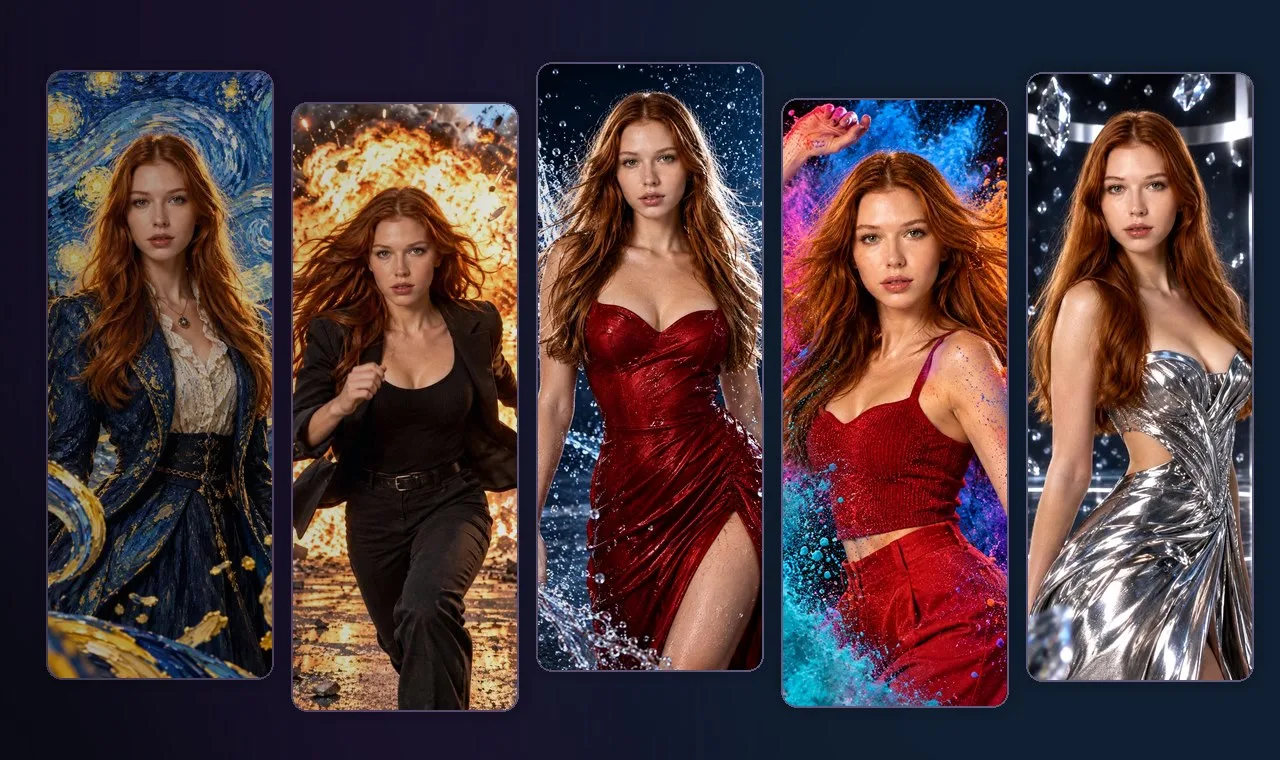
Open a scene to see the full prompt, the model it was tested with and how many guests it was tested with.
An enormous explosion and flying debris, completely frozen behind the participants.
Use Reference Image 1 as the participant identity reference. Preserve the exact number of people, each person's recognizable facial identity, hairstyle, age, skin tone, and realistic body proportions with maximum accuracy. Never add, remove, duplicate, or merge participants.

Create an ultra-photorealistic Hollywood action blockbuster scene capturing the participants at the exact moment of escaping an enormous cinematic explosion on a realistic urban street.

A MASSIVE FIERY EXPLOSION ERUPTS BEHIND THEM.

An enormous orange and golden fireball expands across the background, sending powerful clouds of black smoke, shattered glass, broken concrete, metallic fragments, and debris flying outward through the air.

The participants are running away from the explosion toward the camera, captured in a spectacular frozen-action moment.

Their bodies are suspended in dynamic mid-running poses, with jackets flying backward, hair lifted by the blast, and clothing caught in motion.

Dress everyone in stylish cinematic action outfits, such as realistic business suits, open jackets, smart casual clothing, or premium urban fashion appropriate to each participant.

Facial expressions show believable surprise, determination, and adrenaline while remaining natural and fully recognizable.

IMPORTANT COMPOSITION:

Every participant must remain visible, clearly separated, and recognizable.

For a single participant, create a powerful cinematic action composition with the person prominently positioned in the foreground.

For multiple participants, create a dramatic coordinated escape scene with everyone running in the same general direction, arranged across the frame with sufficient spacing and no overlapping faces.

The explosion must be positioned behind the participants, never covering their bodies or faces.

Capture the entire scene at the precise peak of the explosion, as if time has stopped completely.

Thousands of debris particles, shattered glass fragments, fire sparks, and dust particles are suspended motionless at different distances around the subjects.

Create extraordinary three-dimensional depth with foreground debris, midground participants, and a massive background explosion, specifically optimized for a cinematic 360-degree Bullet Time camera orbit.

Use realistic urban architecture, dramatic orange firelight illuminating the participants, cool natural daylight, physically believable shadows, cinematic atmosphere, and exceptional environmental detail.

Camera: medium-wide cinematic action shot, slightly low angle, professional Hollywood blockbuster cinematography. Maintain enough space around the participants for dynamic orbital camera movement.

Ultra-photorealistic, realistic explosive visual effects, razor-sharp faces, highly detailed frozen debris, extraordinary scale, premium movie production quality.

No additional people, no background crowds, no injuries, no blood, no weapons, no distorted faces, no duplicated limbs, no missing participants, no face obstruction, no text, no watermark.
Walk through three-dimensional swirling blue-and-gold brushstrokes of The Starry Night.
Use Reference Image 1 as the participant identity reference. Preserve the exact number of people, every participant's individual facial features, hairstyle, age, skin tone, and natural body proportions with maximum accuracy. Never add, remove, duplicate, or merge any participant.

Create an extraordinary, breathtaking artistic portrait in which all participants have magically stepped INSIDE Vincent van Gogh's iconic masterpiece, "The Starry Night."

THIS IS NOT A FLAT PAINTING BACKGROUND.

Transform the entire environment into a spectacular three-dimensional world constructed from thick, expressive, swirling oil paint and sculptural brushstrokes, faithfully inspired by Van Gogh's original artistic masterpiece.

The participants stand on a beautiful surreal hillside overlooking the iconic peaceful village, surrounded by rolling blue mountains, expressive painted architecture, and the famous towering dark cypress tree.

Above them, the enormous midnight-blue sky comes alive with gigantic golden stars, a luminous crescent moon, and magnificent spiraling waves of cobalt, ultramarine, turquoise, and rich yellow oil paint.

THE MAGICAL FROZEN MOMENT:

Capture everyone at the precise instant when the painted universe appears to explode into three-dimensional life.

Magnificent swirling ribbons of thick blue and golden paint extend outward from the sky and spiral through the air around the participants.

Hundreds of small glowing painted stars, suspended droplets of golden paint, and textured curved brushstroke fragments float motionless at different distances from the camera.

The entire painted world appears frozen in time, creating an incredible sense of dimensional depth specifically designed for a cinematic Bullet Time camera orbit.

PARTICIPANT APPEARANCE:

Dress everyone in elegant, artistic clothing inspired by late 19th-century European fashion, interpreted with modern luxury editorial styling.

Use flowing deep-blue coats, textured ivory blouses, elegant midnight-blue dresses, sophisticated tailored jackets, and subtle golden accessories appropriate to each participant.

Their clothing should feature beautiful painterly textures that harmonize naturally with the surrounding artwork.

Keep every participant's face highly accurate, recognizable, naturally proportioned, and realistically detailed. Integrate the subjects into the painted universe using soft painterly lighting and subtle artistic texture without distorting their identities.

Capture the participants in elegant, natural, slightly dynamic poses, as though they are experiencing the magical moment of entering the painting.

COMPOSITION:

Automatically adapt the composition to the number of people in Reference Image 1.

For one participant, create a powerful centered artistic portrait surrounded by the swirling painted universe.

For multiple participants, create a beautiful balanced group composition with natural spacing, subtle depth layering, and every face clearly visible.

All participants must remain fully recognizable. No overlapping faces, no hidden people, and no additional background characters.

Position the swirling paint ribbons and glowing stars around the participants rather than covering their faces.

CAMERA AND VISUAL QUALITY:

Create an immersive, cinematic, medium-wide composition with strong foreground, middle-ground, and background separation.

Foreground: floating oil-paint fragments, golden stars, and suspended expressive brushstrokes.

Middle ground: the clearly visible participants standing inside the painting.

Background: the iconic swirling Starry Night sky, luminous moon, painted village, rolling hills, and towering cypress tree.

The environment must have believable three-dimensional spatial geometry rather than the appearance of a flat canvas.

Blend authentic expressive oil-paint textures with cinematic volumetric lighting, beautiful painterly shadows, luminous golden highlights, and extraordinary artistic detail.

The final result should feel like a magical, high-budget cinematic journey into a living masterpiece, with breathtaking visual depth and extraordinary artistic beauty.

Premium fine-art cinematography, authentic Van Gogh-inspired impasto textures, immersive three-dimensional painterly world, exquisite composition, magical frozen-time atmosphere.

No additional people, no duplicated faces, no missing participants, no distorted anatomy, no hidden faces, no flat painted backdrop, no modern city buildings, no unrelated objects, no text, no logos, no watermark.
Colorful clouds of suspended pigment surround a high-energy fashion moment.
Use Reference Image 1 as the identity reference. Preserve the identity of every participant and keep the exact number of people. Do not add extra people.

Create a dramatic portrait designed for a bullet time effect, where the participants are frozen in the middle of a colorful powder explosion. Make the composition work naturally for either a single person or any group present in the reference image.

Show the participants in cohesive energetic poses, as if they have just turned, jumped, celebrated, or struck powerful fashion poses together. Arrange them clearly so all faces are visible and not blocked. For a single participant, keep the subject prominently framed and recognizable.

Add spectacular clouds of magenta, electric blue, orange, violet, and turquoise colored powder suspended around and between them, with premium studio lighting against a dark neutral background so the color bursts stand out. The pigment clouds and particles must never obscure faces.

Include subtle frozen movement in hair and clothing to enhance the suspended-motion look. Create strong three-dimensional layering with vibrant powder at different distances from the camera, specifically optimized for a cinematic Bullet Time orbit.

The image should feel artistic, cinematic, bold, photogenic and high-end, with razor-sharp faces and extraordinary suspended particle detail.

Photorealistic professional advertising photography, vibrant color separation, dynamic yet elegant styling, premium lighting and realistic anatomy.

No extra people, no missing subjects, no face obstruction, no powder covering eyes, no merged bodies, no distorted limbs, no text or watermark.
Water arcs and thousands of droplets hang in midair during a dramatic studio moment.
Use Reference Image 1 as the identity and participant reference. Preserve the exact number of participants, each person's individual facial identity, hairstyle, age, skin tone, and realistic body proportions.

Create an extraordinary cinematic fashion photograph capturing everyone at the precise instant of a dramatic water splash suspended in time.

Place the participants inside a luxurious dark studio with dramatic blue-white lighting, reflective surfaces, and a subtle wet floor. Dress them in stylish premium outfits suitable for an elegant cinematic water-themed fashion campaign.

Massive crystal-clear water arcs and thousands of individual droplets are frozen in midair around the participants. The water forms natural curved shapes that create spectacular three-dimensional depth without covering any face.

Capture everyone in a confident, natural, slightly dynamic pose, with subtle movement in hair and clothing. Preserve realistic facial expressions and natural physical anatomy.

Automatically adjust camera distance and composition for the number of people in Reference Image 1. Keep every participant clearly visible, separated, and recognizable.

Use cinematic side lighting and powerful rim highlights to reveal the water droplets. Create strong foreground, middle-ground, and background layers, ideal for a dynamic Bullet Time camera orbit.

Ultra-photorealistic high-speed water photography, stunning liquid physics, crisp details, sophisticated advertising style, breathtaking cinematic quality.

No extra people, no hidden participants, no water covering faces, no distorted anatomy, no text or watermark.
Floating crystal shards surround a glamorous futuristic fashion scene.
Use Reference Image 1 as the identity and participant reference. Preserve the exact number of people, and preserve every participant's individual facial features, hairstyle, age, skin tone, and body proportions with high accuracy. Do not add or remove any person.

Create a spectacular luxury cinematic portrait in which all participants are frozen in a dramatic moment surrounded by hundreds of suspended translucent crystal and glass-like fragments.

Place the participants in a premium dark studio or futuristic luxury architectural environment with reflective flooring, elegant metallic details, and dramatic silver-white cinematic lighting. The overall atmosphere should feel high-end, bold, futuristic, and visually striking.

Dress everyone in sophisticated contemporary fashion appropriate to their appearance, with sleek editorial styling, premium textures, elegant tailoring, and subtle metallic accents.

Capture each participant in a confident, natural, slightly dynamic pose, as if time has stopped at the peak of a powerful cinematic fashion moment. Hair, fabric edges, and accessories should show subtle frozen motion.

Around them, numerous transparent crystal-like fragments float motionless in midair. These fragments should reflect and refract white, silver, pale blue, and subtle cool highlights, creating extraordinary foreground and background depth. The fragments must never block or distort faces.

Adapt the composition naturally for either a single person or a group. Keep all faces clearly visible, fully recognizable, and well separated. Maintain a balanced formation with strong spatial layering.

Create a striking three-dimensional frozen-action composition optimized for a cinematic Bullet Time orbit, with impressive reflections, luxurious lighting, and premium visual storytelling.

Ultra-photorealistic luxury advertising photography, cinematic realism, highly detailed faces and fabrics, elegant crystal reflections, spectacular spatial depth.

No additional people, no face obstruction, no broken anatomy, no injuries, no duplicated limbs, no hidden participants, no text, no logos, no watermark.
Single-person samples shown. Prompts are written for single and group photos, but results vary by model and source image. Group compatibility and full 360° animation are not guaranteed.
One photo, one video prompt.
Use this universal video prompt with the generated still. A full 360° orbit from one reference image cannot be guaranteed.
Video model: Wan 3.0Input: the generated photo
Video prompt (English)
Create a cinematic, physically realistic BULLET TIME time-freeze video using the provided image as the exact starting frame. The original image defines the people, environment, lighting, objects, and composition. Preserve them faithfully.

TIME IS COMPLETELY FROZEN. Every participant remains absolutely motionless in their original pose. Preserve the exact number of people, faces, identities, hairstyles, body proportions, clothing and relative positions. Freeze all fabric, hair, dust, splashes, liquid droplets, sparks, colored powder, crystals, suspended objects, fire, smoke, brushstrokes and environmental effects in exactly the positions shown. NOTHING within the scene moves. ONLY THE CAMERA MOVES.

Camera motion: a smooth, continuous, high-energy CLOCKWISE ORBIT around the entire frozen subject or group, aiming for ONE COMPLETE 360-DEGREE CIRCLE. Begin in the exact original camera view (0°), travel around the right-side view (90°), continue behind the group (180°), move around their left side (270°), and finish at the same frontal camera angle (360°). Maintain constant height, radius, focus on the group's center, and a stable distance. The camera itself must physically travel around the scene; do not rotate the scene or the people like a turntable.

Use convincing three-dimensional parallax between frozen foreground details, people, and background. Maintain consistent spatial geometry and cinematic lighting from every visible viewpoint. Smooth continuous movement, no cuts, no scene transitions, no zoom-only movement, no camera shake.

Do not animate any person or object. No blinking, running, drifting smoke, growing fire, flowing water, moving particles, body morphing, duplicated limbs, missing participants, added characters, changing faces, changing clothing, or invented text.

The intended result is a spectacular high-budget multi-camera Bullet Time sequence with everything frozen except the moving camera.

IMPORTANT: A full 360-degree orbit is a creative target, not a reliable guarantee from a single flat source image; if unseen rear angles are distorted or the generated orbit stops early, use consistent multi-view references/keyframes or a shorter orbit rather than implying a true 360-degree result.
Not using AI Photo Booth Pro yet?
These prompts run inside AI Photo Booth Pro, the AI photo booth software for events. Try it free for 14 days, no credit card.
Add any prompt as an AI Effect in about two minutes
Photo, GIF, AI effects, face swap and AI video in one app