













Most operators buy the spinning arm, mount their camera, show up to an event, and then scramble through free trials trying to figure out the software side. That backwards approach costs you bookings, kills your reviews, and leaves money on the table. 360 photo booth software is not an accessory, it is the product your clients are actually paying for. Get that right first, and the hardware is just a mount.
What 360 Photo Booth Software Actually Does (and Why It Matters More Than the Hardware)
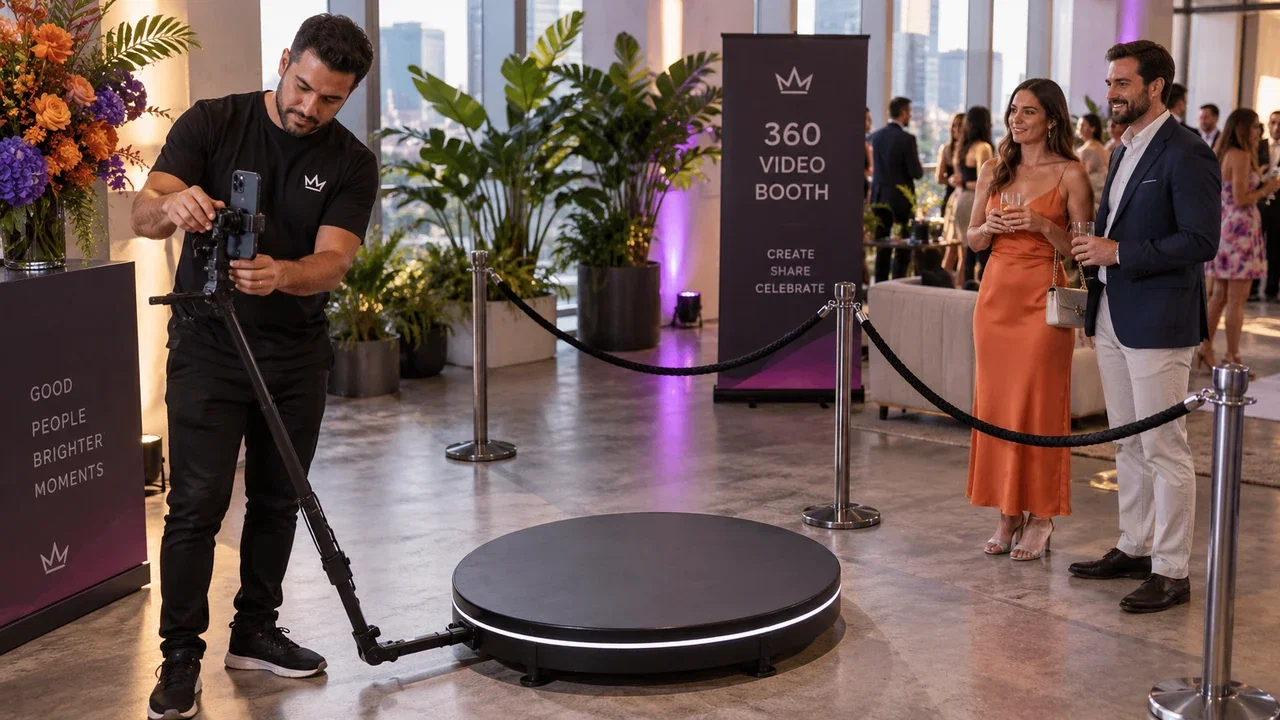
The spinning arm impresses people for about three seconds. The slow-motion video, branded overlay, and instant share link is what they send to 200 people on Instagram. That entire experience lives in the software layer.
Good 360 booth software handles video capture, applies effects in real time or near-real time, burns your client's logo onto every clip, and pushes finished files to a gallery guests can access from their phones in under a minute. Bad software makes guests stand around waiting while you babysit a laptop.
If you are also running kiosk-style activations alongside your 360 setup, the AI Photo Booth Pro platform covers both workflows from a single subscription, which eliminates the chaos of managing two separate tools on event day.
Key Features to Look for in 360 Booth Software: Slow-Mo, Overlays, AI Effects and Sharing
Not every feature list is equal. Here is what actually drives repeat bookings.
- Slow-motion video rendering: Guests expect that dramatic slow-mo playback. Software that cannot deliver smooth 120fps or higher output will disappoint every time.
- Custom branded overlays: Clients pay a premium to see their logo on every share. If the software makes this hard, you lose upsell revenue.
- AI effects and filters: Glamour skin smoothing, background replacement, and animated overlays keep your booth feeling fresh across repeat corporate clients.
- Instant sharing hub: QR codes, SMS, and email delivery that works without a strong internet connection are non-negotiable at venues with weak Wi-Fi.
- Windows compatibility: Most operators run Windows laptops. Make sure your photo booth software for Windows is genuinely optimized, not just technically compatible.
- Analytics and lead capture: Every spin is a data collection opportunity if your software supports it.
If you want to expand beyond video spins, the AI Drawing Screen adds an interactive art activation that pairs well with 360 setups at brand events and trade shows.
Try every feature free for 14 days
AI Photo Booth Pro runs every booth mode and AI effect on the equipment you already own. No credit card required.
Start Free TrialHow to Set Up 360 Photo Booth Software on Your Own Equipment (Step-by-Step)
Setup does not have to be complicated, but sequence matters. Do this in order and your first event runs clean.
- Step 1, Install on your primary laptop first. Do not rely on venue Wi-Fi for the download. Have the software fully installed and activated before you leave home.
- Step 2, Create your event profile. Set the client name, logo, overlay layout, and output resolution before you load the car. Never do this on-site.
- Step 3, Configure your camera connection. Pair your DSLR or action cam via USB or HDMI capture card, confirm the software recognizes it, and lock your exposure settings manually.
- Step 4, Run a full test spin. Capture a real clip at home, apply your overlay, and push it through the sharing workflow end-to-end. Fix problems in your living room, not at the venue.
- Step 5, Load your event on-site and verify sharing. Connect to venue Wi-Fi or your hotspot, confirm QR codes resolve, and do one guest-facing demo before doors open.
For deeper walkthroughs and troubleshooting, the help center has step-by-step guides covering camera configuration, sharing setup, and event day checklists.
Pricing Your 360 Booth Events: What Operators Are Charging in 2026
The 360 market has matured. Clients have seen the booth before, which means you compete on execution quality and add-ons, not novelty. That changes how you price.
Base rates for a 3-hour 360 activation typically range from $800 to $2,500 depending on your market, staffing, and deliverables. The operators at the top of that range are not running better hardware, they are running better software that justifies premium deliverables: branded galleries, lead capture reports, same-night video delivery.
Stacking activations is the fastest way to grow average booking value. Pair your 360 with a Photo Mosaic Wall and you have a two-activation package that commands significantly higher rates than either booth alone.
Why AI Photo Booth Pro Is Built for 360 Operators Who Want Everything in One Platform
Running two or three software subscriptions across different booth types is how you create on-site chaos. AI Photo Booth Pro is designed to be the one platform that covers 360 video, kiosk-style photo activations, and add-on experiences under a single login.
You get slow-motion video support, real-time AI effects, branded overlays, a built-in sharing hub, and event analytics, all from software that runs natively on Windows. Starting at $49 per month with a 14-day free trial and no credit card required, the barrier to testing it against your current setup is essentially zero.
If you are also ready to invest in dedicated hardware, the Event Photo Booth Pro kiosk is engineered to run AI Photo Booth Pro out of the box, which removes compatibility guesswork entirely. You can browse the full booths and hardware catalog to see what fits your rig.
Ready to see the numbers?
Plans start at $49/mo and every plan includes the full mode lineup.
See Plans and Pricing